REA Tools and the Five-Step Pipeline for Reverse-Engineering Applications (Part 2 of 5)
Part 2 of 5. The REA tool chain and the five-step pipeline — deconstruct, analyze, visualize, insight and roadmap, enhance — plus the six benefits that make REA a weekly discipline, not a specialist skill.
By Dr. Sanju Abraham, Fractional CTO, investor, multiple exits. Published November 2, 2026. Part 2 of a 5-part series: How REA (Reverse-Engineer Anything) Will Transform Software Development.
New to the series? Part 1 — What Is Reverse Engineering, and What Is REA? — defined classical reverse engineering (recover architecture from a binary without source) and introduced REA (Reverse-Engineer Anything) as the generalization of that discipline to any opaque artifact a software team touches: legacy service, dependency, competitor product, incident, market. Part 2 (this piece) names the tool chain and the five-step pipeline that turn the discipline into weekly practice. Part 3 — Reverse-engineering a legacy codebase you inherited. Part 4 — Reverse-engineering dependencies, competitors, and APIs. Part 5 — How AI coding tools change the economics of every step.
Key takeaways
- REA tools are not one product category — they are a stack. Static analysis (Ghidra, radare2, IDA Pro, Binary Ninja), dynamic analysis (Frida, strace, dtrace, Wireshark), visualization (Ghidra’s call graphs, Binary Ninja’s HLIL view, Mermaid for hand-drawn maps), insight capture (plain Markdown + the team’s docs system), and change (your normal IDE + VCS). The REA practitioner’s job is composing the stack per artifact, not picking “the REA tool.”
- The five-step pipeline — deconstruct, analyze, visualize, insight and roadmap, enhance — is a workflow, not a product. It applies to a binary, a legacy service, a dependency, or a competitor’s shipping product. The steps are the same; the tools per step differ by artifact type.
- Six real benefits of running REA on purpose: efficiency (automation of mechanical steps), better understanding (durable mental model), enhanced security (vulnerability discovery as a byproduct), interoperability (a model of the other side’s protocol), higher customization (safe modification of what you don’t own), and a future-ready posture (the team can absorb any opaque artifact into its working knowledge within days).
- One widespread myth to correct up front: REA tools do not “reverse engineer the application for you.” They automate the mechanical steps — disassembly, call-graph extraction, cross-reference tables — and leave the interpretation, hypothesis-forming, and model-building to a human. In 2026, AI coding tools (covered in Part 5) narrow that gap substantially; they do not close it.
- The honest cost in 2026. First serious REA run on an unfamiliar artifact: 2–5 engineer-days with the open-source stack, half that with AI assistance and a practiced playbook. Second run on a similar artifact: hours, because the playbook and the shared vocabulary compound. The “weekly discipline” claim is defensible only after the first few passes.
The short answer: REA tools are the composed stack a team uses to run the REA discipline from Part 1 at a cadence of weekly rather than yearly. The stack has five phases — deconstruct (Ghidra, radare2, IDA Pro, Binary Ninja for binaries; git + an IDE for source; Chrome DevTools for a web artifact), analyze (static call-graph tools plus dynamic instrumentation like Frida, strace, dtrace, Wireshark), visualize (Ghidra’s call graphs, Binary Ninja’s HLIL, Mermaid diagrams for the hand-drawn pieces), insight and roadmap (plain Markdown docs committed to the repo), and enhance (your normal IDE and version control). Six benefits make the discipline worth the stack: automation of the mechanical steps, a durable shared mental model, security vulnerability discovery as a byproduct, better interoperability, safer customization of code you do not own, and an engineering team that can absorb any opaque artifact in days. The pipeline is a workflow, not a product; the discipline is the thing, the tools are the instruments.
What are REA tools, exactly?
REA tools are the composed stack of static-analysis, dynamic-analysis, visualization, documentation, and change tooling that a team uses to apply the REA discipline from Part 1 at weekly cadence. The term covers a stack, not a single product category — which is why “what’s the best REA tool?” is the wrong question. The right question is “what’s the right stack per artifact?”
Here is the honest stack as it stands in late 2026, grouped by what each tool does rather than by vendor:
- Deconstruct — turn the opaque artifact into something readable. For a binary: Ghidra (free, NSA-maintained, github.com/NationalSecurityAgency/ghidra), radare2 (free, rada.re), IDA Pro (commercial, hex-rays.com), Binary Ninja (commercial, binary.ninja). For a minified web bundle: Chrome DevTools’ built-in deobfuscator plus
prettier. For a legacy source tree: your normal IDE plusgit log --statandctags. For a wire protocol:tcpdump→ Wireshark (wireshark.org). - Analyze — build a mechanical model of behavior. Static: the call graphs and cross-references that your deconstruct tool already produces, plus linters and type-flow tools native to the source language. Dynamic: Frida (frida.re) for runtime hooking, strace / dtrace / ltrace for syscall tracing, your language’s profiler for hot-path analysis, eBPF tools (
bcc,bpftrace) on Linux for kernel-visible behavior. - Visualize — make the mechanical model readable to a human. Call-graph views built into Ghidra and Binary Ninja; data-flow diagrams via Graphviz or Mermaid; architecture diagrams via Structurizr or C4-PlantUML. The visualization step is where most teams underinvest and where most of the mental-model loss happens.
- Insight and roadmap — turn the model into a durable artifact. Plain Markdown in the repo, committed to version control. Not a slide deck. Not a diagram-only Figma file. Not a Notion page outside the engineering workflow. The output of REA is a design document that lives next to the code and ages with it.
- Enhance — act on the recovered knowledge. Your normal IDE and VCS. Add tests to pin the behavior you just recovered. Refactor the parts you now understand are safe to touch. Document the parts that are not.
In 2026 the free stack covers every step with real production quality — the Ghidra plus radare2 plus Frida plus Wireshark plus Markdown stack is sufficient for most real work. The commercial options (IDA Pro, Binary Ninja) buy UX speed and some reverse-engineering-specific features that matter at specialist scale.
What is the five-step REA pipeline the infographic names?
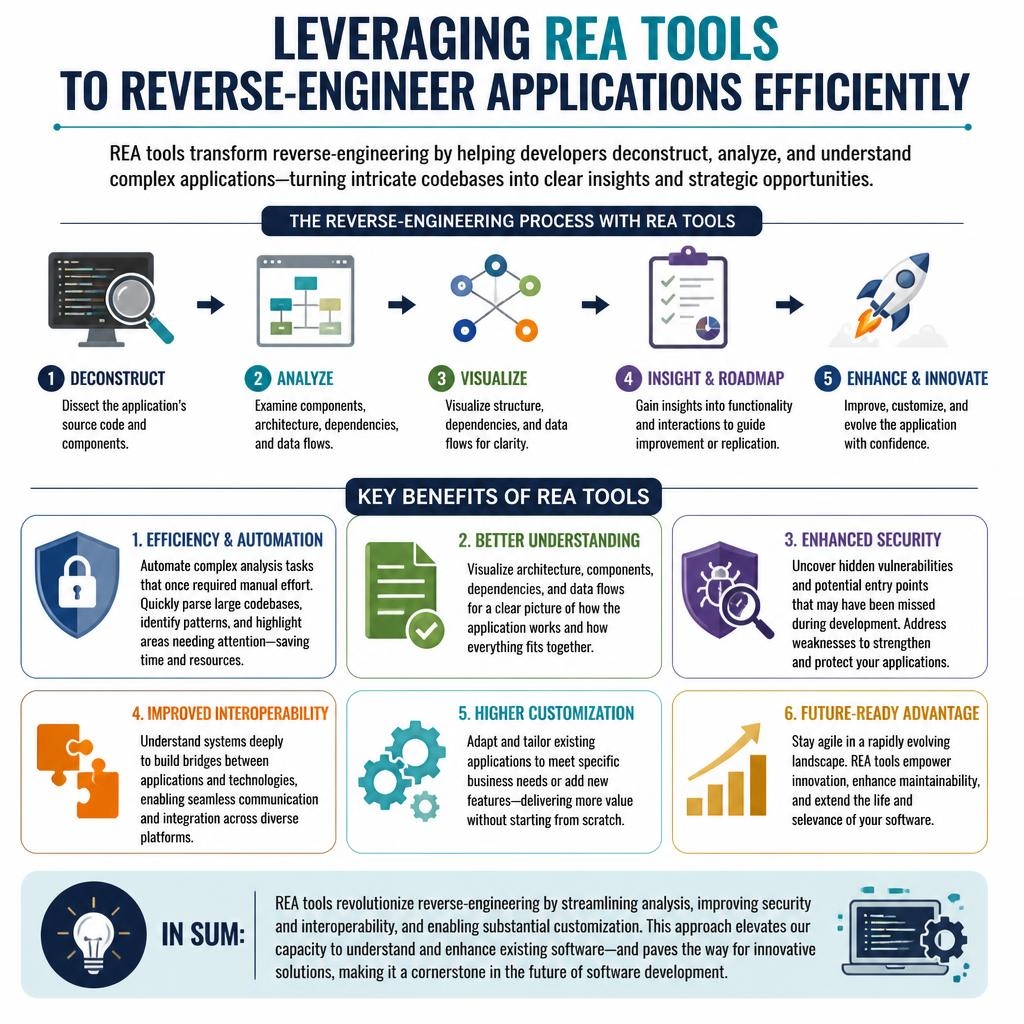
Deconstruct → Analyze → Visualize → Insight and Roadmap → Enhance and Innovate. The infographic above names each step; this section says exactly what each one is, what tool category runs it, and what its output is.
- Step 1 — Deconstruct. Turn the opaque artifact into something a human can read. For a binary: disassembly plus decompilation. For a minified JS bundle: deobfuscation and source-map recovery. For a legacy source tree: a fresh checkout plus repository history. The output is “readable source” — never the original source, but a working proxy for it.
- Step 2 — Analyze. Build a mechanical model of what the readable source does. Static analysis extracts call graphs, cross-references, and data-flow summaries. Dynamic analysis runs the artifact under instrumentation and records what it actually does — which paths are hot, which branches are dead, which syscalls fire, which network calls happen in what order. The output is a bag of facts about behavior.
- Step 3 — Visualize. Convert the bag of facts into a picture a human can hold in their head. Call graphs for control flow, sequence diagrams for interactions over time, data-flow diagrams for how state moves. Most teams skip or undertake this step at the end rather than iteratively — a mistake, because the picture is what makes the model shareable.
- Step 4 — Insight and roadmap. Convert the picture into a committed Markdown document that names the architecture, the interfaces, the data model, the known unknowns, and the next three changes you plan to make. This is the durable artifact of the whole exercise. Without it, the REA run is a conversation that evaporates. With it, the next engineer onto the system starts at Step 4, not Step 1.
- Step 5 — Enhance and innovate. Act on the roadmap. Add tests to pin the behaviors you now understand. Refactor the safe-to-touch parts. Ship the planned change. The REA run is complete when a diff lands and the design doc has been updated to reflect the new state.
A real REA run is not strictly linear — Step 2 often reveals that Step 1 missed something, and Step 5 almost always reveals that Step 4’s model was partially wrong — but the five phases are the right names for the five kinds of work, and treating them as named phases helps a team allocate time.
What are the six benefits of running REA on purpose rather than ad hoc?
The six benefits name why the discipline earns its cost. The infographic lists them; this section says what each one actually buys and under what conditions it holds.
- 1. Efficiency and automation. The mechanical steps of REA — disassembly, call-graph extraction, cross-reference enumeration, syscall tracing — are automatable, and the free stack listed above automates them well. The win is not that no human work is required; it is that the human work shifts from “produce the call graph” to “interpret the call graph.” The ratio of interpretation to mechanical work goes from roughly 1:5 (where it was in 2015) to roughly 4:1 (where it is in 2026, especially with AI assistance).
- 2. Better understanding across the team. A completed REA run produces a committed design doc. That doc is readable by anyone on the team, lives next to the code, and ages with it. The compounding gain is that the next engineer onto that system starts at the doc, not at Step 1. For a 10-50 engineer team, the amortized time saved per system over a year easily exceeds the one-off REA cost.
- 3. Enhanced security. Reverse engineering was already how most serious security review happens — bug bounties, pen-tests, vulnerability research. Running REA on your own systems surfaces the same classes of flaws before an external researcher finds them, and does so as a byproduct of the understanding exercise, not a separate initiative. (Part 1 covered the DMCA §1201 security-research exemption and the EU InfoSoc interoperability carve-out.)
- 4. Improved interoperability. When two systems need to talk and one of them is closed, the only path is REA on the closed one — recover its protocol or data format, document it, implement a compatible client. The win is a working integration where the alternative is either giving up or paying the vendor for an undocumented capability.
- 5. Higher customization. With a design doc for a system you did not write, you can modify it safely — change behavior, add features, adapt to new requirements — without the “I don’t know what I just broke” penalty that normally gates work on inherited code. Customization goes from a quarterly risk to a sprint task.
- 6. Future-ready advantage. A team that practices REA weekly can absorb any new opaque artifact — a surprise acquisition, a vendor outage that forces an interop workaround, a competitor’s shipping behavior that affects a deal — into its working knowledge within days. This is the strongest and the softest claim in the list; it depends on the discipline actually being practiced, not just announced.
Each benefit is real; each benefit has a precondition. The precondition is that the five-step pipeline actually gets run, with an output that lives in the repo, not in a conversation.
Which three claims in the source essay need to be corrected?
Three widely repeated claims that the source infographic implies and the average REA write-up repeats, each wrong or incomplete in a way that matters.
- “REA tools reverse-engineer the application for you.” False in 2026 — and the claim causes real procurement waste. The tools automate the mechanical steps (disassembly, graph extraction, trace capture) and leave the interpretation steps (hypothesis forming, mental-model building, roadmap writing) to a human. AI coding tools (Claude Code, Codex, Cursor, Opencode — the four tools of my prior 15-part series) narrow this gap substantially; they do not close it. The team that treats the AI output as a first draft produces a durable design doc; the team that treats it as the finished product ships a confident wrong model.
- “Reverse engineering is only for legacy or security work.” False — the five canonical roles from Part 1 include three (interoperability, innovation, competitor analysis) that are forward-looking and routine. The “legacy / security” framing is a historical artifact of when the discipline was mostly specialist. In 2026 it is a weekly practice.
- “Automation makes the discipline optional.” False and dangerous. Automation reduces the time cost of REA; it increases, if anything, the judgment cost. A tool that produces a plausible call graph for an unfamiliar binary in two minutes requires a human who can recognize when the graph is wrong — and the mechanical speed makes the error more consequential, not less. The best teams in 2026 run REA more often because the tooling is faster; they also check the output more rigorously.
Each correction matters because each is load-bearing on how a team allocates time and attention. Getting any of the three wrong leads to the same failure mode: a team that owns the tooling and does not practice the discipline.
When does the REA stack actually earn its cost?
Four moments, each of which this series will drill into. Each is a concrete trigger a mid-market engineering team will recognize from the last 24 months.
- You inherited a service and need to change it safely — the Part 3 topic. REA tool chain on the legacy service produces a design doc in days, not a quarter of guessing.
- A dependency misbehaves and the vendor is unresponsive — Part 4. REA on the dependency gives you an actionable mental model within a sprint.
- A competitor claims a capability on a deal — Part 4. REA on the shipping competitor product produces a defensible answer to the sales question.
- A production incident is still half-understood 48 hours in — Part 4 again. REA on the incident reconstructs the actual sequence from logs, metrics, and system diffs, instead of landing on a plausible-sounding story.
Each of these is weekly reality for a 10-50 engineer SaaS team in 2026. The REA stack is the equipment; the pipeline is the technique; the discipline is the thing. Part 3 shows the discipline running on the first and highest-leverage of the four moments: a legacy codebase you inherited.
Frequently asked questions
Do I need to buy IDA Pro to do serious REA work? No. In 2026 the free stack — Ghidra, radare2, Frida, Wireshark, Markdown — is sufficient for essentially every mid-market REA need. IDA Pro and Binary Ninja are faster and nicer at specialist scale, especially for malware analysis and firmware work, but a 10-50 engineer SaaS team can run a weekly REA practice on the free stack indefinitely. Pay for the commercial tools when a specific recurring workload justifies them, not before.
Is Ghidra actually production-ready, or is “NSA-maintained” a nervous joke? Production-ready, and the NSA origin is a feature, not a bug. Ghidra has been open-source since 2019, is actively developed on GitHub, has a large community of contributors outside the agency, and is the default pick for a majority of serious reverse-engineering teams I have seen in Fractional CTO engagements over the past two years. The alternatives are credible, but Ghidra is the default.
Can I skip the visualization step and go straight from analysis to the design doc? You can; most teams do; most teams regret it. The visualization step forces the model into a form you can share, which forces precision. A design doc written without a diagram usually hides a vague model behind confident prose. The one exception: for small, single-component artifacts where a short code tour would serve the same purpose, skip Step 3.
What’s the one tool a team should invest in training on first? Ghidra, by a clear margin. It covers the deconstruct step for any compiled artifact, has excellent built-in visualization, is scriptable in Python and Java, and has an enormous public corpus of tutorials and playbooks. The ROI on a week of focused Ghidra training is unusually high.
Do AI coding tools replace the REA tool chain? No, and this is a common and expensive misconception. AI coding tools (Claude Code, Codex, Cursor, Opencode) drive the REA tool chain more efficiently — a Claude Code session can run Ghidra’s headless mode against a binary, parse the output, and draft a first-pass design doc in minutes. The AI is a competent apprentice, not a replacement for the apprenticeship. Part 5 of this series goes deep on exactly where the line falls in 2026.
How much of the five-step pipeline can realistically be automated end to end in 2026? Steps 1 and 2 are substantially automatable with the free stack plus AI assistance. Step 3 (visualize) is partially automatable — the mechanical diagrams are easy, the ones that fit in a human’s head are judgment calls. Steps 4 and 5 are not meaningfully automatable in 2026, and the teams that try typically produce low-quality design docs that look complete and fail under contact with reality.
Where should the committed design doc actually live in the repo?
Right next to the code it documents. For a service, docs/architecture/rea-report-YYYY-MM-DD.md committed inside the service’s own repository. Keep it in Markdown so it diffs cleanly, so GitHub renders it inline, and so an engineer looking at the service in six months finds it without hunting. The anti-pattern is a central “architecture wiki” in Notion or Confluence — those invariably drift away from the code.
What’s next in this series
Part 3 — Reverse-engineering a legacy codebase you inherited. The acquisition closed, the author left, the tests cover 12% of behavior, and the first production change is Tuesday. The five-step pipeline from this piece, applied to the first and highest-leverage of the four scenarios. If you want help running a real REA engagement on your own stack — a legacy service, a dependency, a competitor’s product, or a post-incident reconstruction — that is a core part of what I do as a Fractional CTO. See the Fractional CTO page or get in touch directly.